How to Organize a Small Desk for Working From Home: A Measure-First Guide
Affiliate disclosure: Nestly Finds is reader-supported. When you buy through links on our site, we may earn an affiliate commission at no extra cost to you. As an Amazon Associate I earn from qualifying purchases.
A small work-from-home desk tends to fill up the same way: a laptop or monitor at the wrong height, a power strip and its cables on the floor, a drawer nobody can find anything in, and pens and chargers spread over the space you need for your hands. Buying organizers first usually makes it worse, because a new tray or riser lands on the same crowded surface. This guide is for anyone working at a desk roughly 40 inches wide or smaller. It starts with a few measurements and a plan, then covers a short list of products in five areas: monitor height, cables, drawers, desktop organizers and small extras. For each product it says who it suits, the size that matters and the most common complaint.
A note on how this page was put together: Nestly Finds hasn’t tested these products. The details below come from the makers’ own listings and from published reviews, which are named in each section.
Start here: measure, plan, then buy
1. Measure the desk, not just the room
Write down three numbers: the desk’s width, its depth (front edge to wall), and the thickness of the desktop at the edge. Depth matters most. The OSHA computer workstation eTool recommends keeping the monitor at least 20 inches from your eyes, with 20 to 40 inches as the preferred range. On a shallow desk, a monitor on its own stand can end up too close, which is where a monitor arm, or a riser that leaves room underneath for the keyboard, earns its space. Desktop thickness decides whether clamp-on items fit at all: every clamp lists a thickness range, and a frame or crossbar under the edge can block it. Also measure the inside of each drawer (width, depth and height). Our guide to measuring before you buy organizers walks through it.
2. Clear the desk by zones
Take everything off and sort it into three piles: things you touch every hour (keyboard, mouse, phone, one pen), things you use every day or week (notebook, charger, headphones, files), and things that don’t belong on a desk at all. OSHA’s guidance on desks says to keep the keyboard, mouse and phone within easy reach. The first pile goes back within arm’s reach, the second goes into a drawer or one organizer, and the third leaves the desk. Only then is it clear what kind of storage, and how much, you actually need.
3. Make a cable plan before you buy any cable gear
Cable products work best in a set order. Popular Science’s guide to hiding cables starts by getting cords off the floor with an under-desk tray, then bundling them with reusable ties every foot or two, then clearing the desktop itself. Desk maker FlexiSpot’s cable management guide gives similar advice: mount the power strip under the desk first, route the cables to it, bundle them, leave some slack, and hide what’s left with a cover, tray or clips. Before ordering, measure your power strip and check that it fits the tray you’re considering. If your desk moves up and down, run it through its full range before tightening anything.
4. Get the ergonomic basics right
A few rules from the OSHA eTool are worth knowing before you buy a riser or a footrest:
- Screen height: “The top of the monitor should be at or slightly below eye level,” with the center of the screen 15 to 20 degrees below eye level. Put the screen directly in front of you.
- Keyboard height: your elbows should be about level with the keyboard, hanging comfortably at your sides, with your wrists straight and in line with your forearms (OSHA on keyboards).
- Bifocal wearers: if you tilt your head back to read the screen, OSHA suggests lowering the monitor or raising the chair, not raising the screen.
- Feet and legs: keep the space under the desk clear for your legs. If you have to raise the chair to get your elbows level with the keyboard and your feet no longer rest flat, OSHA suggests a footrest (OSHA on chairs).
For laptop users this usually means two things: the laptop goes up, and the typing moves to a separate keyboard and mouse.
Quick comparison
| Product | Best for | Key size or spec | The catch |
|---|---|---|---|
| Amazon Basics Adjustable Monitor Riser | A small, cheap lift for one screen | About 16.1 x 11 in; 3 heights | Plastic; reviewers call it less stable than metal |
| WALI Adjustable Monitor Stand Riser | A sturdier metal lift | 14.6 x 9.3 in platform; 3.9, 4.7 or 5.5 in high | The 9.3 in platform is shallow for wide monitor feet |
| HUANUO HNDS6 Dual Monitor Stand | Two screens on a shallow desk | Clamp fits desks 0.59 to 3.54 in thick | Needs tension tuning; a frame under the desk edge can block the clamp |
| Litwaro Under-Desk Cable Tray | Getting the power strip off the floor | 13.38 x 4.72 in; clamps 0.4 to 2 in | Flat-edged desks only; check that your power strip fits |
| Alex Tech 10 ft Cord Protector | Turning a cable bundle into one line | 10 ft, ½ in split sleeve | The self-wrap can loosen at some angles |
| Newlan Reusable Cable Ties | Bundling cables you’ll change later | 60 hook-and-loop ties | Best for medium bundles |
| Vtopmart 25-Piece Drawer Organizers | Sorting small supplies in a desk drawer | 4 bin sizes, all 2 in tall | Drawer must be over 2 in tall inside; bins won’t fill an odd-sized drawer exactly |
| SpaceAid Bamboo Drawer Dividers | Wide, deeper drawers | 2.35 in tall; 13.25–17 or 17–22 in sets | Some owners say the spring is weak |
| SKYDUE Rotating Pen Organizer | Pens and tools in a small footprint | 5 slots, rotates 360° | Some reviewers find it flimsy |
| Lamicall Spring Cable Clips | Keeping chargers at the desk edge | 8 clips for 2.5–8 mm cords | Adhesive needs a smooth surface; not for thick cords |
| Aothia PU Leather Desk Pad | A defined spot for keyboard and mouse | 23.6 x 13.7 in, 0.08 in thick | Thinner than many buyers expect |
| ComfiLife Foot Rest | Feet that don’t reach the floor | 17.5 x 12 x 6 in; removable 2 in layer | Foam may compress over time |
Monitor height
Start with the OSHA rule: the top of the screen at or slightly below eye level. Most external monitors need only a few inches of lift, which a fixed riser can give. A laptop usually needs more, along with a separate keyboard. On a desk too shallow for a 20-inch viewing distance, an arm that clamps to the back edge frees the surface under the screen.
Amazon Basics Height-Adjustable Monitor Riser
A plastic riser with stacking legs that sets one monitor or a laptop at one of three heights, with open space underneath.
- Best for: a single, lighter monitor that needs a small lift, or a laptop paired with an external keyboard, on a tight budget.
- Size / fit: about 16.1 x 11 inches overall (Pack Hacker’s spec listing). SpecPicks notes that the top tapers, so the usable flat area at the center is closer to 11.6 x 11 inches. Work While Walking measured the three heights at about 2.6, 4.25 and 4.9 inches. Rated to 22 lb.
- The catch: it’s ABS plastic. Work While Walking’s review says it “looks cheap,” calls it less stable than other risers and notes that the 22 lb limit isn’t enough for some monitors. The legs stack rather than lock.
WALI Adjustable Computer Monitor Stand Riser
A metal riser with three fixed height settings and a storage gap underneath for a keyboard, notebook or tablet.
- Best for: anyone who wants a sturdier metal platform than a plastic riser, and a monitor that needs a little more lift.
- Size / fit: the listing summarized by SpecPicks gives a 14.6 x 9.3 inch platform, heights of 3.9, 4.7 or 5.5 inches, and a 44 lb (20 kg) capacity. WALI sells several close variants, including versions with a drawer that list slightly different heights, so check the exact model on the listing.
- The catch: a 9.3-inch-deep platform is narrow. SpecPicks flags it as tight for monitors with wide feet, so measure your monitor’s base before ordering.
HUANUO HNDS6 Dual Monitor Stand (gas-spring arms)
Two gas-spring arms on one pole that clamp to the desk edge or mount through a grommet hole, so both screens float above the desktop.
- Best for: two monitors on a shallow desk, where freeing the surface under the screens and pushing them back for viewing distance matters more than a simple shelf.
- Size / fit: HUANUO’s product page lists screens from 13 to 32 inches (elsewhere the same page says up to 30 inches), 4.4 to 19.8 lb per arm, VESA 75×75 or 100×100, and a C-clamp that fits desktops 0.59 to 3.54 inches thick. The arms tilt, swivel and rotate.
- The catch: setup takes some work. HUANUO says to set each arm’s gas-spring tension with the monitor mounted, and to adjust it again if a screen drifts up or down. It recommends a reinforcement plate for glass or engineered-wood desks, and a frame or crossbar under the desk edge can block the clamp. Check your monitor’s weight and VESA pattern first.
Cables
Follow the order from the start-here section: lift the power strip, route and bundle, then cover. These three products handle those steps. A whole kit isn’t needed for a small desk.
Litwaro Under-Desk Cable Management Tray (no-drill clamp)
A carbon-steel mesh basket that clamps to the underside of the desk edge to hold a power strip, adapters and spare cable length.
- Best for: renters, or anyone who doesn’t want to drill into the desk, who needs the power strip off the floor.
- Size / fit: the seller lists the standard tray at 13.38 x 4.72 inches, with longer 15.75-inch and 25-inch versions. The clamps fit desktops 0.4 to 2 inches thick, and it is rated for about 15 lb, with rubber pads to protect the desk.
- The catch: the seller says it’s for flat-edged desks only, and one reviewer found it a tight fit and wished for a bigger size. Measure your power strip, plug heads included, against the 4.72-inch width.
Alex Tech 10 ft Cord Protector (split sleeve)
A self-wrapping split sleeve that gathers several cords into one neat run, for example from the desk edge down to the outlet.
- Best for: the visible drop from desk to wall, or the cables running up a monitor arm.
- Size / fit: 10 feet of ½-inch split sleeving. Popular Science, which named it the best overall cable management product in its desk guide, notes that it is UL recognized.
- The catch: Popular Science found that the self-wrap can loosen at certain angles. It also advises keeping it away from pets, even though the maker says it resists chewing. A ½-inch sleeve holds a limited number of cords, so it’s for a bundle, not every cable on the desk.
Newlan Reusable Cable Ties (60-pack)
Hook-and-loop straps that bundle cables and open again, so swapping a charger or adding a lamp doesn’t mean cutting zip ties.
- Best for: the bundling step, tying cords together every foot or two along their route, and for setups that change often.
- Size / fit: 60 reusable ties. Popular Science named this pack its best budget pick for desk cable management.
- The catch: Popular Science says they suit medium bundles best. For a thick bundle, a sleeve or tray does more of the work.
Drawers
A desk drawer works best as the home for the “every day or week” pile. Measure the inside width, depth and height before choosing between small bins and long dividers. Shallow pencil drawers suit low bins, and deeper, wider drawers suit dividers.
Vtopmart 25-Piece Clear Drawer Organizer Set
A set of clear plastic bins in four sizes that you arrange like a puzzle to give each small item its own spot.
- Best for: small supplies (clips, sticky notes, earbuds, cables, flash drives) in a standard desk drawer, and anyone who wants to see what’s in each bin.
- Size / fit: per Apartment Therapy’s write-up, the set has eight 3 x 3-inch bins, eight 6 x 3-inch, six 9 x 3-inch and three 9 x 6-inch, all 2 inches tall, with attachable rubber feet. They also stack.
- The catch: every bin is 2 inches tall, so the drawer needs a little more than that inside to close, and the 9-inch bins need a drawer at least 9 inches deep. The sizes come in 3-inch steps, so an odd-sized drawer will have gaps. Sketch the layout on paper first.
SpaceAid Bamboo Drawer Dividers with Inserts
Spring-loaded bamboo dividers that expand to wedge across a drawer, with small cross inserts and labels for making compartments.
- Best for: wider or deeper drawers holding larger things (notebooks, a tablet, chargers, a mouse) that loose bins can’t hold upright.
- Size / fit: SpaceAid’s listing at Target gives a divider height of 2.35 inches and expanding sets for 13.25–17-inch and 17–22-inch drawers, held by a spring-loaded design with non-slip rubber pads. The 17–22-inch set comes with 4 dividers, 9 inserts and 30 labels.
- The catch: owner reviews on the same Target page are mixed. One says the dividers are “very loose and easily bumped” because “the spring is weak,” and another returned a set that was too short for their drawer. Measure the drawer’s inside length and buy the range it falls in.
Desktop organizers
On a small desk, the surface is for the “every hour” pile and nothing else. One compact holder for pens and tools plus a fixed spot for charging cables covers most of it. Paper that stays on the desk usually means it doesn’t have a home in a drawer or on a shelf yet.
SKYDUE 360-Degree Rotating Pen Organizer
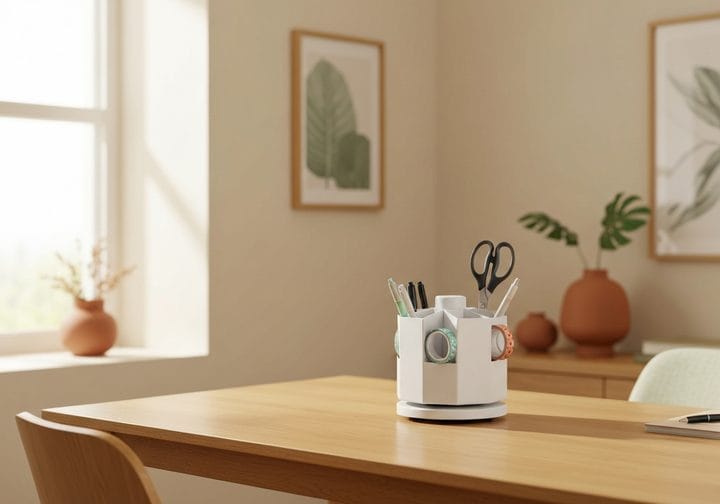
A round plastic caddy with five vertical slots that spins, so every pen, pair of scissors or marker is reachable from one side.
- Best for: a desk corner that needs to hold more tools than one pen cup without spreading out sideways.
- Size / fit: five slots on a base that rotates 360 degrees. Product pages describe the slot layout but not a verified footprint, so check the dimensions on the listing against the corner you have.
- The catch: in the review summary on BestViewsReviews, some owners found it flimsy, and one said it “turns fine but gets a little stuck on one side.” Don’t expect it to hold heavy tools.
Lamicall Spring-Loaded Cable Clips (8-pack)
Small adhesive clips with a spring-lock that hold the ends of charging cables at the desk edge, so they don’t slide off onto the floor when unplugged.
- Best for: phone, watch and headphone chargers you plug in and out all day.
- Size / fit: per 9to5Toys’ summary of the listing, the eight clips hold cords 2.5 to 8 mm thick and use peel-and-stick acrylic adhesive meant for smooth, dry surfaces such as wood, glass and tile.
- The catch: 8 mm is the limit, so thick power cords won’t fit. The adhesive is specified only for smooth surfaces, so on a textured or painted desk it may not hold. Clean the spot and let the adhesive set before clipping a cable in.
Small extras
Add these only after the basics are in place. Each one should fix a specific problem: a desk surface that’s slippery or easily scratched, or feet that don’t rest flat once the chair is at the right height.
Aothia PU Leather Desk Pad
A thin faux-leather mat that protects the desk and marks out a fixed zone for the keyboard and mouse.
- Best for: a laminate or wood desk that’s slippery, cold or easily scratched, and anyone who likes a clear boundary for the work area.
- Size / fit: this listing is the 23.6 x 13.7-inch size, 0.08 inches thick, with a PU leather top and a suede-style non-slip back, per SpecPicks’ listing summary.
- The catch: ShopSavvy’s review summary says it’s “thinner than many buyers expect,” with less cushioning than real leather, and some buyers found the color different from the photos. At 13.7 inches deep, a full-size keyboard plus wrist room is a squeeze, so check the listing for a larger size if your desk has the depth.
ComfiLife Foot Rest
A memory-foam footrest for under the desk, for when raising the chair to keyboard height leaves your feet without support.
- Best for: shorter users, or anyone with a fixed-height desk whose chair has to sit high. That’s the situation where OSHA suggests a footrest.
- Size / fit: ComfiLife’s product page gives 17.5 x 12 x 6 inches, high-density memory foam, a detachable bottom layer that adds or removes 2 inches of height, a removable machine-washable cover and an anti-slip bottom.
- The catch: ShopSavvy’s review summary says the foam “may compress over time,” the height range is limited for very tall users, and it takes up a fair amount of floor space under the desk, which OSHA says should stay clear for your legs.
If you only buy one thing
Buy the item that fixes your biggest posture problem, which for most small desks is screen height. A riser (or an arm on a shallow desk) that puts the top of the screen at about eye level helps every hour you work, and it frees space under the screen. Next, lift the power strip off the floor with an under-desk tray. Pens, pads and drawer bins can wait until the desk has been cleared by zones. Before ordering anything, measure the desk depth, the desktop thickness and the inside of each drawer. Our measuring guide shows how. For clutter elsewhere in the house, try our one-weekend kitchen declutter plan.